Clarity in content engages your audience, sets you apart from competitors, and improves your SERP performance. Each sentence should be simple, direct, and tailored to your target market.
Yet, copy editing often lets ambiguous phrasing or redundant words slip through. Here, you'll discover:
- Practical techniques to spot confusing sections, streamline your structure
- How to use editing tools effectively.
- Common pitfalls.
- And when professional guidance can make all the difference.
Let's turn good content into great content!
What Is Copy Editing?
Copy editing is the process of improving a piece of writing to make it clear, correct, and easy to read. It focuses on correcting grammar, punctuation, spelling, and sentence structure without altering the original message.
What Copy Editing Covers:
- Fixes grammar, spelling, and punctuation to make the text correct
- Simplifies long or unclear sentences for easier reading
- Keeps tone, style, and formatting consistent across the document
- Improves flow between sections so ideas connect naturally
- Ensures all names, numbers, and dates are accurate and consistent
- Makes the message clear and easy to follow for the target audience
What It Doesn't Cover:
- Rewriting the whole text or changing the main idea
- New research or verifying complex data
- Creating page layouts, visuals, or design elements
- Handling major structural or content changes
Here's a checklist for self-editing:
- Is the meaning clear on first read?
- Can any sentence be shorter?
- Are tone and formatting consistent?
- Are facts and details accurate?
So, good copy editing helps your content look professional, keeps readers engaged, and ensures your message is easy to understand.
How Do You Know If Your Content Is Unclear?
When your content is confusing, readers might struggle to follow your ideas. Here are some clear clues:
- Long, Complicated Sentences: If your sentences go on and on or use too many big words, people might not understand what you mean.
- Low Interaction: If hardly anyone reads, likes, or comments on your work, it could be because they find it hard to follow.
- Missed Goals: Your writing should help answer questions or indicate the next steps to take. If it doesn't, your readers might feel lost.
- Mixed-Up Words and Layout: Using different words for the same idea or failing to organize your text effectively can confuse your content.
When you notice these signs, it's a good idea to simplify and clarify your writing, like tidying up a messy room so everything is easy to find.
Ways To Improve Text Clarity
Improving text clarity isn't just about fixing grammar—it's about ensuring your ideas come through clearly.
Thus, we'll explain how to focus on your purpose, organize your thoughts, and cut out unnecessary words. We'll also discuss the value of reading your work aloud and asking for feedback.
1. Know Your Goal and Audience
Before you begin editing, it's essential to know exactly what you want your content to achieve and who you're writing for. Ask yourself:
- What is my goal?
- Do I want readers to learn something, feel inspired, or take a specific action, such as signing up or buying a product?
- Who is my audience?
- What are their needs and expectations, and how can I serve them?
When you answer these questions, you create a clear roadmap for your writing. This way, every sentence works for you, so you can connect with your readers and accomplish your business goals.
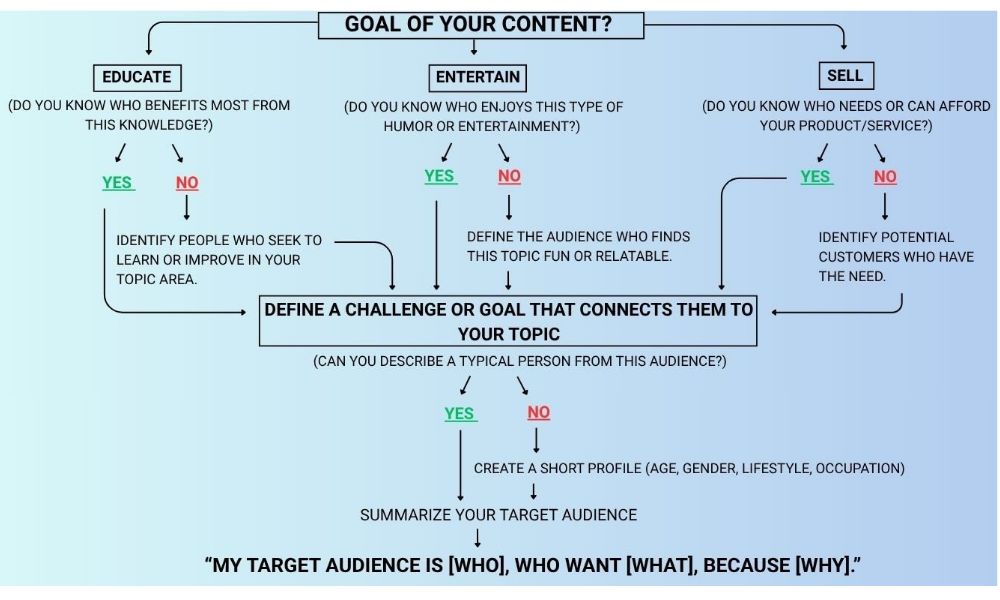
The visual below outlines how to define your content goal and target audience, showing three main paths: educate, entertain, or sell.
2. Read Through the Entire Piece
Reviewing your content from start to finish allows you to experience it as a complete narrative rather than isolated sections. This helps you see:
- If your ideas flow logically.
- Is your tone consistent?
- If every part supports your overall goal.
As you read, note parts that feel out of place, such as rough transitions, repetitive points, or confusing phrases needing clarification. This helps you quickly spot top performers to keep and weak content that needs attention or removal.
3. Analyze the Structure
Start with your introduction—does it clearly state what you will cover? Then, examine the body of your text.
Examine each paragraph and determine if it focuses on a single main idea. Are the paragraphs arranged in a way that makes the connection between thoughts clear?
Also, check your headings and subheadings. They should give a good preview of each section's content. Reading your work from beginning to end can help you see if the order of your points makes sense. If something feels out of place or repetitive, consider rearranging the sections to improve the flow.
4. Scan for Excess Verbiage
When reviewing your writing, examine each sentence closely and decide if every word is truly needed. Extra words can make your text feel cluttered and slow down the reader.
So, ask yourself: does this sentence add something new or repeat a point already made? For example, consider the sentence:
"Due to the fact that it was raining, we decided to postpone the event." This can be trimmed to: "Because it was raining, we postponed the event."
Another example might be:
"In my opinion, I personally think that the weather is very cold today," which can be simplified to: "I think the weather is very cold today."
By removing words that don't change the meaning, you make your text easier to understand and strengthen your ideas by presenting them clearly and straightforwardly.
5. Use Editing Tools
They check your writing for spelling and grammar errors, as well as sentences that are too long or confusing. Tools like Grammarly, Hemingway Editor, and Quillbo highlight areas where you can simplify your sentences and clarify your ideas. They work directly in your writing programs or browser, allowing you to fix issues as you go and save time.
Still, tools can't always replace the precision of a human editor. That's where a professional editing and proofreading service makes a difference—reviewing tone, logic, and flow to ensure your final draft is clear and polished.
6. Get Feedback From Others
When you're too close to your work, it's easy to miss parts that might confuse readers. Therefore, invite a colleague, friend, or someone from your target audience to read your content. Ask them if your ideas are easy to follow and if any sections seem unclear or awkward.
This process helps you see your work from a different perspective, ensuring your final draft is as clear and understandable as possible.
7. Read Your Content Aloud
Reading your content aloud lets you experience your words as your readers would. It can reveal parts that feel clumsy or out of place. Try these simple steps:
- Listen for Awkward Phrasing: For instance, if you say, "The event was postponed due to the fact that it was raining heavily," does it sound simple? You might try, "Because it was raining, we postponed the event."
- Notice Long or Complicated Sentences: If you stumble or pause, that could be a sign that the sentence is too long.
- Catch Repetition: Repeating the same words or ideas may indicate that you must change your language.
- Ask Yourself Simple Questions: "Does this sentence sound clear when spoken?" "Is it easy to follow?"
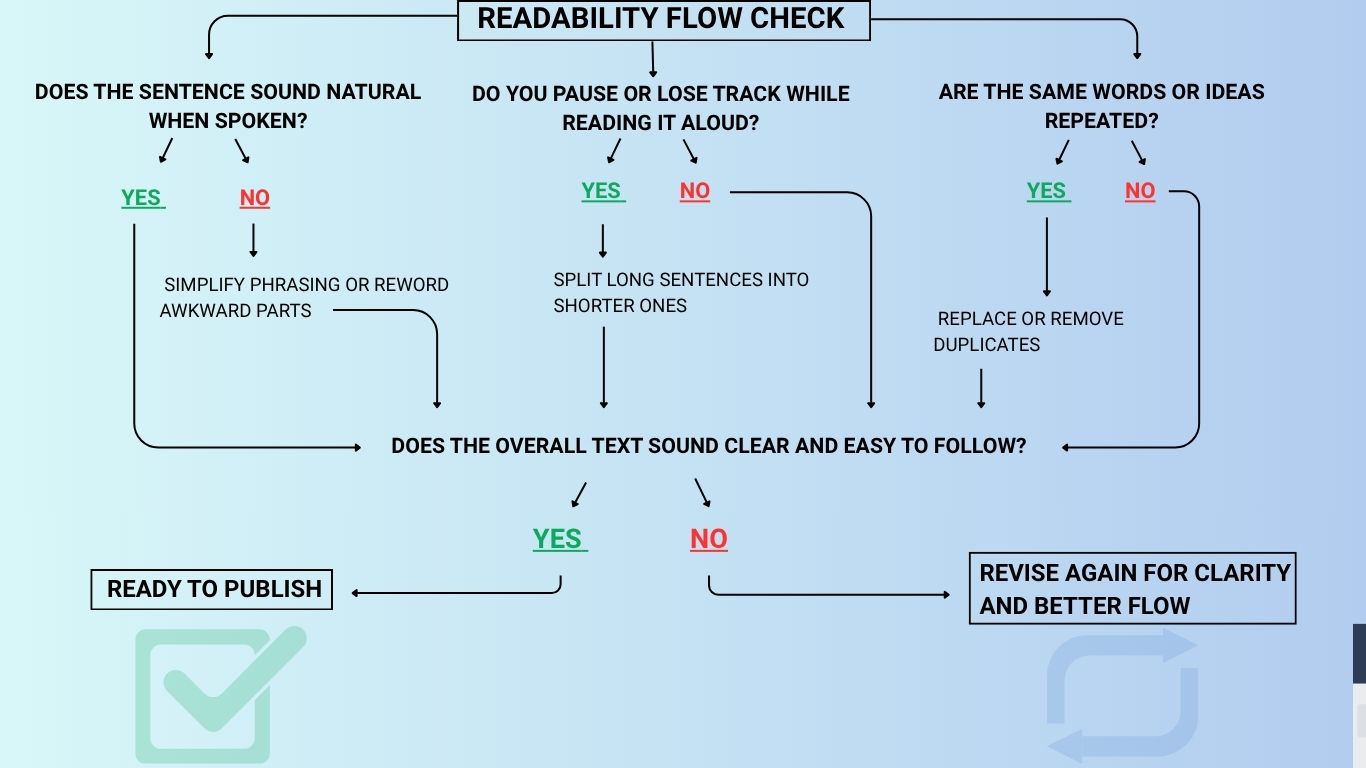
This simple exercise helps you pinpoint parts of your writing that might confuse your audience, allowing you to rework them until your words sound natural and clear.
8. Focus on Your Opening and Closing Common
Your opening and closing are the bookends of your post—they quickly inform your readers what to expect and leave them with a lasting impression. Here's how to make them as straightforward as possible:
- Answer the Main Question Immediately: If your post is about editing for clarity, you might begin with: "Improve your writing by cutting out confusing language and unnecessary words."
- Explain How the Post Addresses This Question: Briefly mention that the blog will show specific methods to clear up your text, such as identifying vague phrases, trimming excess words, and using editing tools.
- Set Clear Expectations: Clearly communicate to readers what aspects of the topic will be covered, such as: "In this guide, you'll learn practical steps to refine your content quickly and effectively."
When it concludes, offer a brief recap of the main points without introducing new information.
Then, include a clear Call to Action (CTA) so readers know the next step—such as reading another article, subscribing, or taking another action. For example, "Ready for more tips? Click here to explore our next guide."
Content Editing Mistakes to Avoid
Here are common content editing mistakes to avoid:
- Typos & Spelling Errors: Even minor mistakes can distract readers and erode credibility.
- Grammar & Punctuation Errors: Incorrect punctuation or grammar can muddle your ideas.
- Inconsistent Style: Shifts in tone or formatting disrupt the flow and confuse readers.
- Overly Complex Sentences: Long, complicated sentences make your message hard to follow.
- Excessive Jargon: Too much technical language can alienate readers unfamiliar with the terms.
- Not Adapting to Your Audience: Your language should match the reader's level of understanding.
- Inconsistent Details: Ensure dates, numbers, and names are formatted uniformly.
- Insufficient Fact-Checking: Verify all data and sources to maintain trust and credibility.
- Poor Keyword Integration: When writing for the web, naturally include relevant keywords to boost visibility.
When To Use a Professional Editor Help?
When your writing needs more than just a quick fix for typos and basic grammar, consider enlisting Vitas Digital Group's help. These extra editing layers go beyond simple proofreading, making your entire piece as strong as possible.