SEO optimization helps your content stand out for both search engines and readers. Without it, even the best ideas can go unnoticed. This guide breaks down the process into a few key areas.
- First, we cover research and keywords - ensuring your content speaks the language of your audience.
- Next, we focus on structure, demonstrating how clear headlines, engaging titles, and the strategic use of visuals enhance the reading experience.
- Finally, we examine ways to boost engagement and conversions, such as adding expert quotes and strong calls to action.
Let's start!
How to Measure Blogging Performance?
Begin by reviewing your blog's current performance using Google Search Console. This tool gives you a clear picture of your post's visibility, including clicks, impressions, and the search terms that drive traffic.
Open Google Search Console and click on Performance > Search Results > New > Page. Then, input the blog post URL you want to update. The console will show key metrics like:
- Clicks: How many times have users clicked through?
- Impressions: How often did your post appear in search results?
- Search Terms: Keywords users are using to find your post.
How to Optimize Blog Posts for SEO?
Once you have this data, you can identify areas for change and track your progress over time - from keywords and headlines to content quality, visuals, and links. This section provides practical steps to resolve issues and assist you in improving the post's ranking.
Do Keyword Research
Every content has the chance to rank for a range of search terms, and it all starts with smart keyword research. You begin by selecting a primary keyword - a high-level term that sums up your topic (e.g., "indoor garden tips" or "best gardening tools").
From there, consider several variations:
- Secondary keywords: Synonyms and similar terms.
- Related keywords: Topics closely connected to your main term.
- Long-Tail keywords: Specific phrases with lower search volume but higher intent.
- Question keywords: Common questions your audience might ask.
Tools like the Keyword Magic Tool or Ubersuggest help you discover these keywords. Just enter your topic, website URL, and target location.
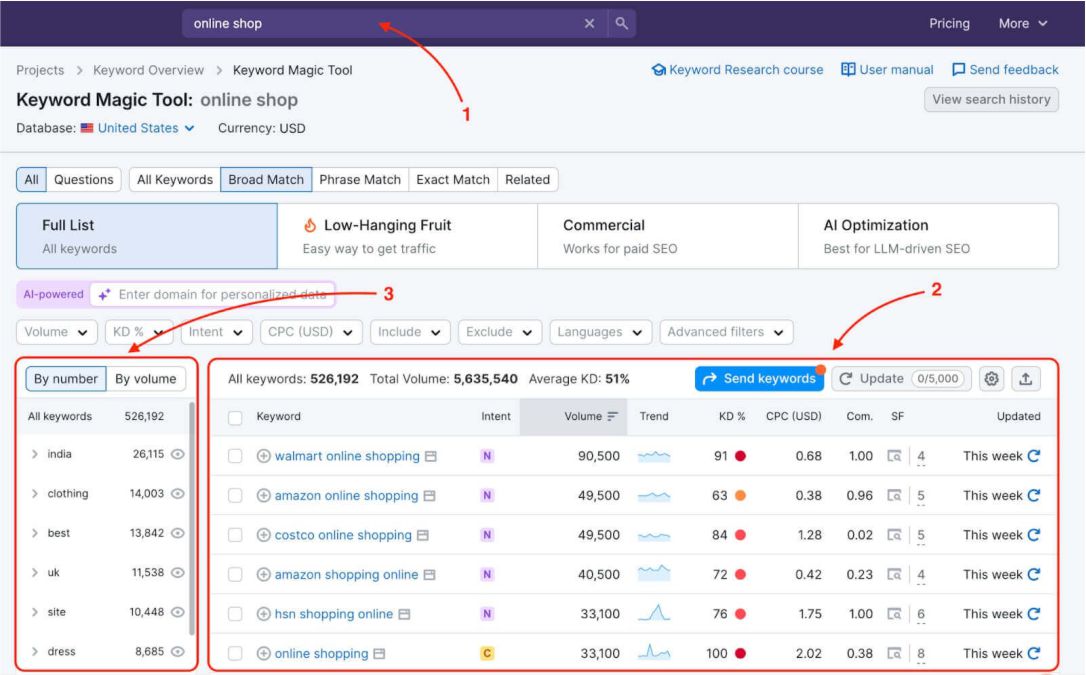
Source: Semrush
Look for:
- Search volume: The average monthly searches.
- Personal keyword difficulty (PKD%): How challenging it might be for your site to rank.
- Search engine results page (SERP) features: Extra search result elements (like People Also Ask).
Find Semantic Keywords for Your Focus Keyword
After selecting your main keyword, the next step is to broaden your topic with semantic keywords. Variations, synonyms, and related terms help search engines understand the full scope of your content.
For instance, if your focus is on "indoor garden tips," semantic keywords might include:
- Houseplant care
- Indoor plant maintenance
- Urban gardening ideas
Using these terms indicates to search engines that your content comprehensively covers the topic. Select related phrases with clear search intent and decent search volume, and naturally incorporate them into your text.
Optimize Headings and Subheadings
Think of your headings as chapters in a book. They guide both readers and search engines through your content. Use one H1 for your main title, H2s for major sections, and H3s for detailed points within those sections.
- Your H1 should match your title tag and include your target keyword.
- H2s should break down major topics, with H3s and beyond adding finer details.
- Use secondary keywords in your headings without forcing them.
- Keep it clear and concise. Short, descriptive headings enable readers to scan and locate the necessary information quickly.
Organizing your copy with clear headings and subheadings makes your content user-friendly and improves its chances of ranking higher in search results.
Write an Effective Post Title
The title is the first thing readers see, so make it count. An effective title grabs attention, includes your target keyword, and stays under 60 characters (575 pixels) to avoid being cut off in search results or a minimum of 30 characters (285 pixels).
The title tag informs readers and search engines about the content of your post, which in turn influences rankings and click-through rates. How to optimize it? Follow these steps:
- Keep it Short: Stick to around 60 characters.
- Include Your Keyword: Place your primary keyword near the beginning.

- Make it Click-Worthy: Use engaging language that encourages users to click.
Headline analyzers can provide insights and title suggestions to enhance the organic click-through rate (CTR). A well-crafted title improves SEO and entices readers to explore your content further.
Optimize Your Meta Description
This description summarizes the content of your page that appears under your title in search results. Although it doesn't directly boost rankings, a good description can improve click-through rates, which can help your rankings.
How to write meta descriptions? Follow these rules:
- Keep it brief: Aim for approximately 150 characters to avoid being cut off.
- Use active, clear language: Write as if you're speaking directly to the reader and invite them to learn more.
- Include your focus keyword: This helps search engines connect your description to the query.
- Make it unique: Avoid duplicate descriptions and tailor each one to match its corresponding page content.
Add Visuals and Multimedia
Adding visuals and videos can elevate your content and support SEO, but you need to follow a few simple rules:
- First, choose images that truly relate to your topic, rather than relying on generic stock photos.
- Rename your image files with descriptive names that include your focus keyword once, and write clear alt text that accurately explains what the image shows - avoid names like "truck.png" or "moving truck.png."
For example, change the file name to "loading-moving-truck.png" and set the alt text to "Loading a moving truck with black crates."
- This avoids keyword stuffing and helps search engines and screen readers understand your image.
- Also, compress your images so they load quickly - speed is a ranking factor.
And, never upload videos directly to your site, as this can slow down page load times. Instead, host your videos on platforms like YouTube or TikTok, then embed them in your blog.
Ensure your videos have descriptive titles and tags, and consider providing a transcript or summary to give search engines more context!
Leverage Internal Linking
Internal linking is about connecting the pages on your website to benefit readers and search engines. But, before adding any links, consider the purpose of each link and ensure it fits naturally within your content.
Ask yourself: Does this link provide additional value or context? Use as an example, this poor and strong linking strategy:

Plan your linking strategy by identifying related articles, older posts, or cornerstone content that supports your current topic. However, be cautious not to add too many links, as this can overwhelm your readers and dilute the value of each link. Always prioritize quality and relevance over quantity.
Include Expert Insights
Including expert insights adds credibility and depth to your blog. These insights show that you've done your homework and added value beyond your personal views. For instance, if you're writing about digital marketing strategies, a quote from a well-known marketer or data from a recent study can strengthen your arguments.
Be sure to attribute your sources properly and integrate these insights naturally into your narrative so they enhance the reader's experience without interrupting the flow.
Use Bucket Brigades
Bucket brigades are short, engaging phrases that keep readers interested and guide them from one idea to another. They work like conversation cues, inviting your audience to continue reading.
On the other hand, phrases like "Here's the deal," "What happens next," or "But wait, there's more" help break up long passages and make your writing feel more interactive.
Use these transitions sparingly and naturally so they enhance rather than distract from your message. They're especially useful in long-form content where maintaining reader engagement is key.
Improve Readability Score
Readability plays a big role in keeping visitors on your page. With most users scanning content quickly - often in less than a second - you need to make it easy for them to understand your message quickly.
- Clear, short sentences and concise paragraphs help your readers quickly grasp your points. Adding white space, clear headings, and bulleted lists makes the page look less crowded and guides the reader through your content.
- Tools like Grammarly can highlight areas where your writing might be improved.
Focusing on these simple tweaks can improve the reading experience and send positive signals to search engines.
Include a Call-To-Action (CTA)
A call-to-action (CTA) prompt encourages your readers to take a specific step, such as subscribing to your newsletter, downloading a free guide, or making a purchase. It can appear as buttons, text links, or banners at the end of an article, within engaging content sections, or in the sidebar.
Use clear, direct language, such as "Get Your Free eBook" or "Start Your Free Trial," so that readers know exactly what to expect when they click. The goal is to make the next step obvious and appealing. By using relevant keywords in your CTA text, you also help search engines index that content properly.
Optimize for Featured Snippets
Featured snippets are concise answers at the top of Google's search results. For better chances of being featured, structure your content with:
- Clear headings
- Bullet points
- Numbered lists.
Answer common questions directly—aim for about 40 to 60 words per snippet. Keep answers concise for frequently asked questions (FAQs) and limit them to 29 words, if possible.
Write a Detailed Author Bio
A detailed author bio builds trust with your readers and signals expertise to search engines. It should include:
- Your name
- Credentials
- Brief overview of your experience in the field
Make a Short URL Slug
A short, SEO-friendly URL makes it easier for both search engines and users to understand the content of your page.
Avoid long, complex URLs with unnecessary characters or numbers. Instead, include your primary keyword and keep it clear and descriptive, such as: "/blog/optimize-blog-posts-seo" rather than lengthy dates and parameters.
Implement Social Share Buttons
Adding social share buttons makes it easy for readers to share your content on platforms like Facebook, X (Twitter), and LinkedIn. This simple addition improves engagement and helps drive more traffic to your site. Place the buttons in visible spots (at the top, side, or bottom) of your article so users can quickly share if they find your content valuable.

If you notice consistent drops in impressions or ranking, or you're unsure which elements are blocking performance, consider getting expert help through our SEO service to review your content structure, internal linking, and keyword alignment before you publish updates.
When You Need to Optimize a Blog Post for SEO?
It needs a refresh at certain critical moments to stay visible.
- First, every new post should be built with search-friendly elements from the start. Equally, as time passes, content can lose its spark and relevance.
- Once current posts no longer reflect recent trends or your evolving viewpoint, if a post starts to lag in performance, it's a clear sign that your readers and search engines require better quality.
Ultimately, when your pages score poorly, quick SEO wins are necessary to enhance your website's performance.
Ready to Optimize Your Blog Post?
Now you know the key steps: research keywords, structure your content with clear headings and engaging titles, add relevant visuals, track performance, and include expert insights, CTAs, and internal links.
But if you're not an SEO expert or part of a whole team, your progress can slow down, and you may miss valuable opportunities. Contact us for a quote and receive expert assistance for quick, effective improvements.