Page speed is how fast a website loads after someone clicks on it. It includes everything on the page: text, images, videos, buttons, and code. If a page loads too slowly, visitors may leave before they even see your content.
Fast websites improve user experience and SEO performance. Google also uses page speed as a ranking factor, especially on mobile devices.
When your website loads faster:
✅ Visitors stay longer
✅ Pages feel smoother and easier to use
✅ Bounce rates can decrease
✅ Search engines can crawl pages more efficiently
Below, we'll break down what affects page speed, how loading performance is measured, common causes of slow websites, and practical ways to improve page load speed.
What Is Page Speed?
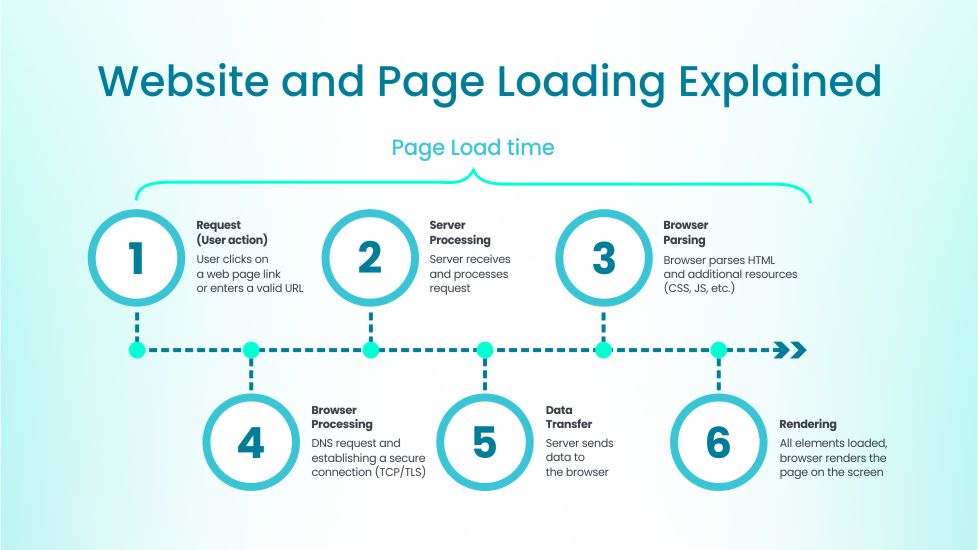
Page speed means how quickly the content of a single web page becomes fully visible and usable after someone clicks a link. It's not just about how fast something appears—it's about how fast the entire page is ready to scroll, click, and interact with.
When someone lands on your page, their browser has to load every element, including:
- Text and fonts
- Images and background visuals
- Videos and audio files
- Buttons and menus
- Tracking tools (analytics, pixels)
- Code files like JavaScript and CSS
If just one of these is too large or slow, it can delay the entire page. Here are the most common reasons why your page might be loading slowly:
- File sizes — Larger images or videos = longer loading times
- Number of requests — Every item on your page is a separate request
- Third-party scripts — Like ad trackers, chat widgets, or embedded tools
- Server performance — A weak server or overloaded hosting slows down delivery
- Code efficiency — Bulky, unminified code takes longer to process
Remember, even small delays add up—and users will notice.
Page Load Speed Vs Site Speed
Page speed refers to how fast one specific page loads, while site speed is the average load time across multiple pages on your website. And, this distinction matters because Google doesn't rank websites as a whole — it ranks individual pages.
Factor | Page Load Speed | Site Speed |
Definition | How fast a single page load (e.g., "About" page or a blog post). | The average loading time across all pages on your website. |
Measurement | Evaluated per URL using tools like Core Web Vitals. | Calculated as a site-wide performance average. |
SEO Impact | Google ranks individual pages, not whole websites — each page must be fast. | Slow sections (like blogs or product pages) lower overall SEO performance. |
Example | Your homepage loads in 1.5s, but your blog takes 5s — the blog will rank lower. | The slower pages pull down the site's overall user experience and metrics. |
Optimization Focus | Improve Core Web Vitals (LCP, FID, CLS) for each key page. | Maintain consistent optimization and monitoring across the entire website. |
So if your homepage is lightning fast, but your blog posts or product pages are slow, those pages will still drag down your SEO performance and user satisfaction. In practice:
- Google uses Core Web Vitals to evaluate each URL on your site.
- Pages that load faster tend to perform better in search.
- A few underperforming pages can reduce overall visibility and traffic.
That's why fixing just your homepage or landing page isn't enough — every page that brings organic traffic must meet speed standards.
Why Is Page Speed Important for SEO?
Google wants to show users the best results—not just in content, but in overall experience. Even if your page has great information, it won't matter if people leave before it loads. And, here's how slow page speed affects SEO:
Improves User Experience
Fast-loading pages feel better to use. Visitors don't have to wait; scrolling is less laggy, and everything responds quickly.
Sites that load in under 2 seconds keep people engaged longer, which increases the chance they'll read, click, buy, or contact you.
On the flip side:
- Slower pages frustrate users.
- They're more likely to abandon the page entirely.
- You lose trust before your content even appears.
Google knows this, which is why user experience metrics (like Largest Contentful Paint) are built into its ranking system.
Reduces Bounce Rate
A bounce rate occurs when someone visits a page and leaves without taking any action. Slow speed is one of the top reasons for a high bounce rate. People won't wait for your content, no matter how good it is.
For example:
- A blog that takes 5+ seconds to load will lose most of its organic readers.
- An e-commerce product page that lags can kill purchase intent.
- Even portfolio sites or landing pages get ignored if they load slowly.
The longer the delay, the higher the chance the user hits "Back"—and that hurts your SEO.
Mobile-First Indexing
Most users browse on mobile, so faster loading is crucial. Therefore, since 2019, Google has used mobile-first indexing practices, not desktop.
If your mobile experience is slow—even if your desktop site is fast—you'll lose visibility in search.
This matters because:
- Most traffic now comes from mobile.
- Mobile devices often use slower connections.
- Mobile users are less patient.
Google uses Core Web Vitals like First Input Delay (FID) and Cumulative Layout Shift (CLS) to measure mobile usability and speed. If your mobile page fails here, it affects ranking—even if the content is good.
Direct Ranking Factor
Page speed isn't just a performance metric—it's built into Google's ranking system through something called Core Web Vitals. These are real-world measurements that reflect how users actually experience your site.
Here are the three main metrics Google uses:
- Largest Contentful Paint (LCP): Measures how long it takes for the main visible content—like a large image, headline, or text block—to fully load.
✅ A good LCP score is under 2.5 seconds. If this takes too long, your page feels slow to users.
- First Input Delay (FID): Tracks how long it takes before a user can interact with your page—for example, clicking a button or opening a menu.
✅ A fast FID means the site isn't just visible, but also responsive. Google recommends keeping it under 100 milliseconds.
- Cumulative Layout Shift (CLS): Measures how much the layout unexpectedly shifts while loading—like when buttons move or text jumps around.
✅ This can be frustrating for users, especially on mobile. A good CLS score is under 0.1.
Together, these signals tell Google if your page is fast, usable, and stable. If you score poorly, your page may struggle to rank—even if the content itself is excellent.
How to Improve Page Speed?
Improving your website's speed doesn't have to mean a full redesign. Most slowdowns come from a few common issues—and they're fixable. Here's a breakdown of what to do and why it works:
The "right image format" refers to using the file type that provides the smallest size without losing visible quality. For SEO, this matters because large image files slow down your page, especially on mobile, and Google sees that as a poor experience.
Slow-loading images delay the full page load, affecting metrics like Largest Contentful Paint (LCP), which is a direct ranking factor.
To choose the right format:
- Use WebP or AVIF for web visuals—they're modern, small, and fast.
- Use JPEG for regular photos if you need broad compatibility.
- Use SVG for icons, logos, and simple graphics (they scale well and load instantly)
Choosing the right format can instantly cut image size by 30–80%, which makes your page much faster.
Compress Your Images
Image compression means reducing the file size of your images without ruining how they look. This is one of the fastest ways to improve page speed—and it directly helps SEO by reducing load time and improving user experience.
Even if you're using the right format, uncompressed images can still be huge.
Here's how to do it:
- Use free tools like TinyPNG or ImageOptim.
- Export images at the right dimensions before uploading (don't resize in-browser)
- Avoid uploading 3000px-wide images if your layout only needs 800px
For most pages, images should ideally be under 100KB. Anything over 200KB will slow you down.
Enable Browser Caching
Browser caching lets a user's browser store static files like logos, fonts, and CSS locally after their first visit. That way, when they come back, the browser doesn't need to reload everything—it pulls it instantly from their device.
Why this matters: Caching reduces repeated requests to your server, which speeds up load times and reduces bounce rate—both positive SEO signals.
How to enable it:
- On WordPress: use plugins like W3 Total Cache or WP Rocket
- On custom sites: configure your .htaccess file or set rules in your CDN panel.
- Set long expiration times (e.g., 1 month or more) for static assets.
Proper caching turns a 3-second return visit into a near-instant one.
Minify JavaScript, CSS, and HTML
This means removing unnecessary characters and spaces from your code so files load faster. It doesn't change how your site looks—it just makes it leaner.
Large, unminified code files take longer to load and block rendering. This affects metrics like First Input Delay (FID), which impacts rankings.
To minify:
- Use tools like Minifier.org, UglifyJS, or CSSNano.
- Use WordPress plugins like Autoptimize or WP Rocket.
- If you're using Webflow or similar, enable auto-minify in site settings.
Bonus: minification also improves mobile performance, which is essential for Google's mobile-first indexing.
Use a Content Delivery Network
A CDN is a network of servers placed around the world that delivers your site's content from the location closest to your visitor. This shortens the distance data has to travel—and that makes your site load faster everywhere.
Without a CDN, users far from your main server may experience delays. That hurts performance scores and SEO, especially if your audience is global.
To set it up:
- Try Cloudflare (free for basic use)
- Alternatives: Bunny.net, Amazon CloudFront, Fastly
- Many hosting providers offer built-in CDN options.
Once active, a CDN will automatically serve your images, scripts, and files faster to every visitor. If you want full technical assistance, our on-page SEO optimization service covers page speed improvements, Core Web Vitals audits, and content structure fixes to keep your site ranking fast and high.
Improve Your Server Response Time
Server response time is how quickly your hosting server responds to the first request from a user's browser. If your server is slow, everything else—images, text, scripts—gets delayed.
Google considers slow server response a major issue. It affects Time to First Byte (TTFB), which directly influences search rankings.
To improve it:
- Upgrade to faster hosting (avoid cheap shared plans if you can)
- Use performance-optimized hosts like SiteGround, Kinsta, or Vercel.
- Minimize backend load by cleaning up unused plugins or heavy database queries.
If your site is slow even with image and code optimization, your server may be the problem.
Reduce Redirects
Redirects are when one URL leads to another. Every time that happens, the browser makes an extra request and waits longer for the final content to appear.
Too many redirects slow down your site and affect user experience—especially on mobile. This also impacts Google's crawl budget and delays how quickly pages get indexed.
What to do:
- Avoid redirect chains (e.g. A → B → C → D)
- Update internal links to point directly to the final URL
- Clean up legacy redirects after major site migrations or rebrands.
How to do that? Use tools like Screaming Frog or Ahrefs to find and remove unnecessary redirects.
Reduce HTTP Requests
Every element on your site (images, stylesheets, scripts, fonts) creates a separate HTTP request. More requests = more loading time.
Reducing them helps your page load faster, improves LCP and FID scores, and gives users a smoother experience.
Here's how:
- Combine multiple CSS or JS files into one.
- Use fewer fonts (avoid loading 3–4 variations)
- Remove plugins and third-party tools you don't actually use
- Load only the scripts needed for that specific page.
Fewer requests = fewer delays = better rankings.
Ready to Improve Your Technical SEO?
Page speed affects how fast search engines can crawl your site, how users experience your pages, and how high you rank. That puts it right at the core of Technical SEO. If your site is slow, Google will rank faster competitors first.
So, schedule a free consultation with our team and let's find out the best strategy based on your goals!