An eBook or any other kind of digital publication can do great things for your brand. You can offer it in exchange for email addresses for marketing, use it to warm up your leads, or even sell it for direct profit.
But if the eBook isn't all that good, it won't help you reach your goals. In fact, it might even damage your brand's reputation if the information is incorrect or if the content layout is messy.
We'll walk you through five essential steps for formatting eBooks and digital publications correctly — from removing clutter to testing final files. You'll also learn when to rely on professional document formatting services for faster and more consistent results.
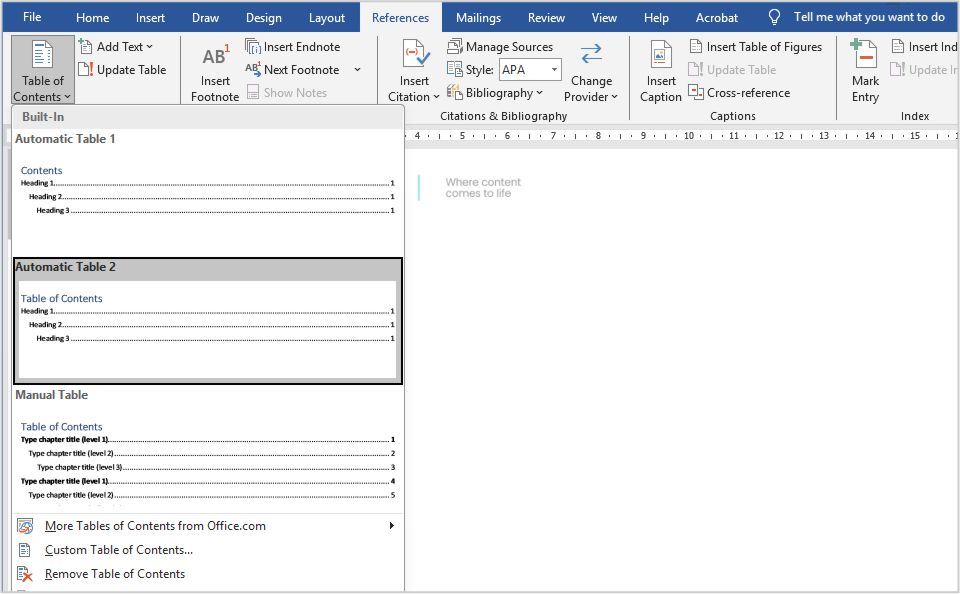
Table of contents
The Importance of Document Formatting Services for Your eBook
The digital publishing market is becoming more competitive as the global number of eBook readers continues to grow and is expected to surpass one billion by 2027. Effective formatting ensures your content layout meets digital publishing standards, aligns with your brand identity, and delivers a pleasant experience across all devices.
Without it, you risk poor readability, broken spacing, and lower engagement. Here's what good formatting does for your eBook:
- Improves readability and keeps readers engaged from start to finish
- Strengthens your brand image and professionalism
- Ensures consistent content layout across devices and platforms
- Meets accessibility and publishing compliance standards
- Increases perceived value and conversion potential
If you want your digital publication to reflect quality on every page, professional document formatting services can make all the difference.
How to Format Your eBook
Before applying these steps, choose your formatting tool wisely. Platforms like Microsoft Word, Kindle Create, and Adobe InDesign each serve different needs — Word for text-focused eBooks and InDesign for visual-heavy layouts.
Step 1: Remove Existing Formatting
The first step in formatting your eBook is to remove any existing formatting from your manuscript. This includes eliminating: unnecessary page breaks, automatic numbering, and bullet points. You should also set the font to one used across your branding and adjust the body font size to around 11 and the title font to slightly larger.
Clearing all previous formatting is what ensures that your eBook maintains a consistent style throughout. It provides a clean slate, so it's easier to apply the correct formatting systematically.
What this step essentially does is prevent inconsistencies that could make your eBook look unprofessional and make the rest of your job easier.
Step 2: Format the Front Matter
The front matter includes everything that appears before the main content of your eBook. What you include in this section depends on whether your eBook is fiction or non-fiction.
- For a fiction eBook, the front matter may consist of a title page, copyright page, dedication, and table of contents.
- Non-fiction eBooks often require additional sections, such as a preface, acknowledgments, and a list of the author's other works.
In marketing, this space is usually reserved for special thanks, a table of contents, or background information on the author or the company.
To properly format the front matter, use page breaks to separate each section. This makes sure that every element starts on a new page, making the layout more organized and visually appealing.
Step 3: Format the Body
The body is where your readers spend the most time, so focus on clarity and structure.
The body is the most critical part of your eBook, as it contains the main content. To make it more readable and professional, you need to pay attention to several aspects of formatting.
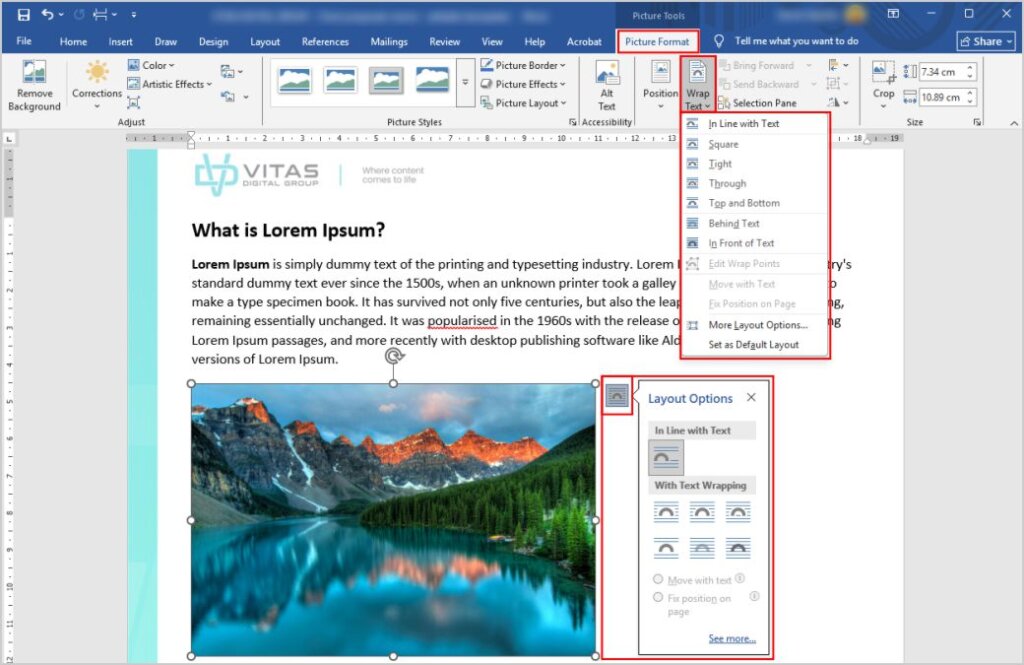
If your eBook includes images, they should be in .jpg or .png format. Images should be placed strategically between paragraphs and should have consistent dimensions. Adding captions below the images helps provide context to readers.
One of the most important elements is the font style. While chapter headings can use distinct fonts, the body text should use a standard, easy-to-read font. It is also important to maintain uniformity throughout the eBook and make it more cohesive with your overall branding.
For larger projects, many businesses rely on a professional formatting & layout service to keep styling consistent across every chapter and page.
Font size is another thing to consider. Chapter headings should typically be between sizes 14 and 18, while the main text should be between 10 and 12. Avoid using excessively large or small fonts – this can make your eBook difficult to read.
Headers and footers also play an important role in formatting. Including the book title and author name in the header adds a professional touch. Footnotes and page numbers can also be placed in the footer to help readers navigate the content more easily.
Proper spacing and indentation contribute to the readability of your eBook. The first line of each chapter should be indented, while line spacing should be set between 1.2 and 1.5 for better clarity. Margins should be around 0.5 inches on both sides to ensure adequate spacing. But this also depends on personal preference and brand guidelines.
Another important formatting aspect is paragraph structure. Avoid widows and orphans (single lines of text that are left alone at the beginning or end of a page). Adjusting paragraph spacing can help prevent these formatting issues, giving your eBook a cleaner, more professional look.
Step 4: Format the End Matter
The end matter consists of sections that appear after the main content. For fiction eBooks, this often includes an acknowledgment page, an "About the Author" page, and an afterword for fiction eBooks. Non-fiction eBooks (including those for marketing purposes) may require additional sections, such as a glossary, discussion questions, and a bibliography.
Like the front matter, the end matter should be divided into separate pages using page breaks. Consistency in font style and size should also be maintained to ensure a professional appearance.
Step 5: Test and Convert the File
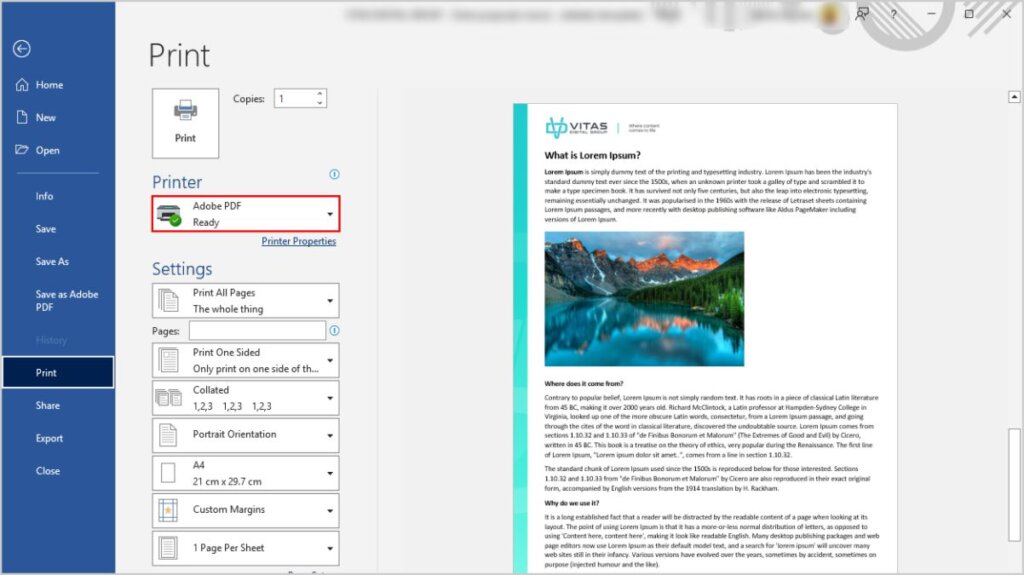
The final step in formatting your eBook is to test the file and convert it into the appropriate format. Previewing the formatted version helps you find any errors or inconsistencies before publishing.
Depending on the platform you plan to publish on, you may need to convert your eBook into different formats. Common formats include electronic publication (EPUB), Mobipocket (MOBI), and Portable Document Format (PDF). Each format has specific advantages, so choose the one that best suits your distribution needs.
Create More Professional Content
By applying consistent formatting throughout your content, you can make your eBook easier to navigate and more engaging for readers across different devices.
If you need assistance with formatting or managing your eBook content, feel free to contact us for more information.